
Add an Identity Provider to Carbon Black App Control
To add an identity provider to Carbon Black App Control, perform the following procedure.
Complete the steps to add Carbon Black App Control as a Service Provider for your IdP. See Integrate Carbon Black App Control with an IdP.
- On the Carbon Black App Control SAML Login page, click Add Identity Provider.
-
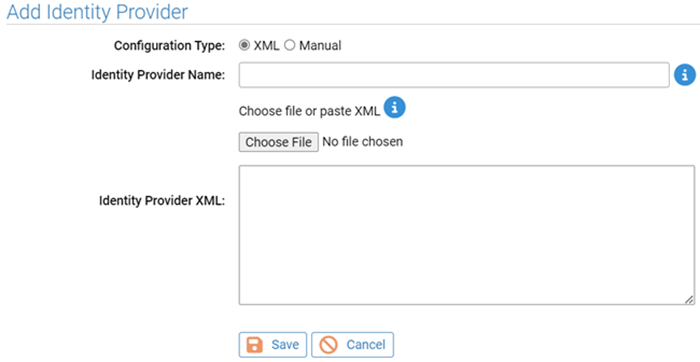
Leave the Configuration Type as XML and enter an
Identity Provider Name. This is the name that will appear on the Carbon Black App
Control login
page. It is used for easy identification and has no programmatic impact.
- On the IdP site, locate the page that contains public IdP XML metadata for this provide,r and either copy the XML metadata or download it to a file.
-
Return to the Carbon Black App
Control SAML Login page,. In the Add Identity
Provider dialog box, do one of the following:
-
In the
Identity Provider XMLfield, click the Choose File button to download the identity provider XML.-or-
-
Paste the XML you copied from the identity provider into the window below Identity Provider XML.
-
- Click the Save button at the bottom of the Add Identity Provider dialog box. The IdP is now configured in Carbon Black App Control.