
Integrate Carbon Black App Control with an IdP
To add Carbon Black App Control as a Service Provider for an identity provider, perform the following procedure.
In the terminology of SAML, Carbon Black App Control is a Service Provider. Identity providers and Service Providers must create a trust relationship to work together. The key step required for this trust is to exchange XML metadata with each other. The following procedure requires that you login to both your IdP and your Carbon Black App Control Console.
- Log in to your identity provider’s website, or if you have not yet activated an IdP, create an account with one.
- Go to the page where your provider allows you to add a new service provider.
-
Where prompted, enter the name (FQDN) for your Carbon Black App
Control Server.
For example:
cbpserver1.myorg.local. -
Select one of the following attributes to map IdP accounts to existing
Carbon Black App
Control Console accounts. In either case, the data used for
mapping must include an email address that matches an existing console account:
- Use
NameIDin the following format:urn:oasis:names:tc:SAML:1.1:nameid-format:emailAddressand provide theNameIDAttribute that identifies email addresses on your IdP- or -
-
Use an attribute with name
EmailAddress(capitalized as shown). If you provideEmailAddress, it is always used for mapping, even when there is no matching Carbon Black App Control Console account.
- Use
- Log in to the Carbon Black App Control console. Click the Settings (gear) icon in the console menu, and click System Configuration.
-
Click the SAML Login tab.
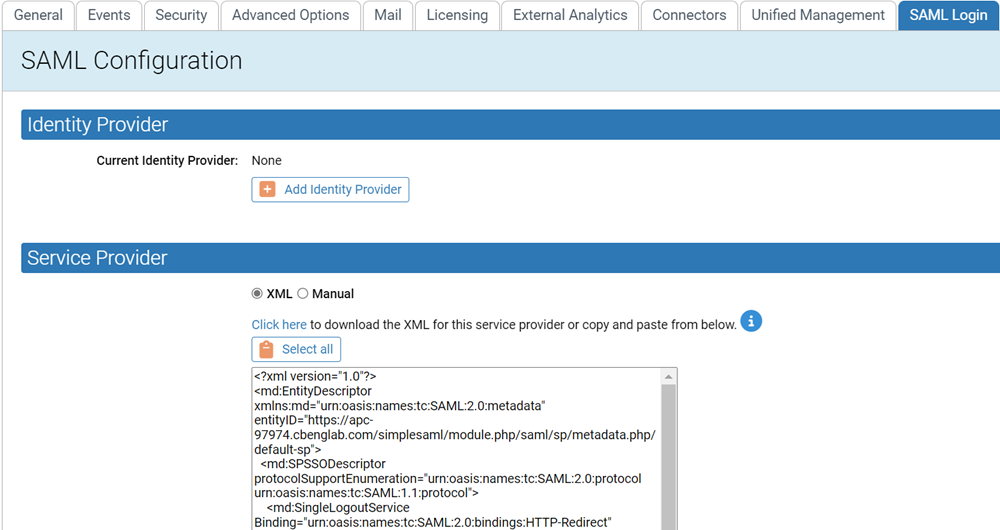
-
In the Service
Provider section, do one of the following:
-
In the
Service
                                    Provider XML
field, click the Click here link to download the Service Provider XML.-or-
- Click the Select all button and copy the XML from the window.
-
- Go to your IdP page for configuring a Service Provider and follow the instructions for importing or pasting the Carbon Black App Control XML.
- Enter any other information required by the IdP site, and when finished, submit or save your Service Provider information.