
Specifying Paths and Processes
When you specify Path or File in a Rapid Config, you have some of the options that are available in Custom, Registry, and Memory rules.
These include:
- Specify a directory or a file/process – You can enter a path or process specification that exactly identifies a file by path and name so that only that file matches the rule. You also can enter a specification that identifies a directory, and so affects all files or processes in that directory and its subdirectories.
- Specify a local drive or UNC path (Windows only) – You can use a local drive name, such as C:\folder1\subfolder\application.exe, to identify a local path or process. For a remote path or process, use a UNC path, such as \\computer\dir\app.exe. Mapped drives in a path or process specification are not recognized.
-
Use wildcards – You can use wildcards (
?for any one character and*for zero or more characters) to expand the scope of a path or process specification, or to help you match a file or folder whose exact location you don’t know. Wildcards may be used at the beginning, end or middle of a path. - Specify multiple paths or processes – For some paths and processes, you can add more than one path definition per rule.
-
Use path macros – You can use special macros to identify certain well known folders, even if you don’t know their exact location on agent computers. Macros are platform-specific.
Note: For more information regarding Macros, see Using Macros in Rules . -
Use conditional macros – If you use conditional macros (such as
OnlyIf), the condition you set applies only to the specific parameter with the macro.
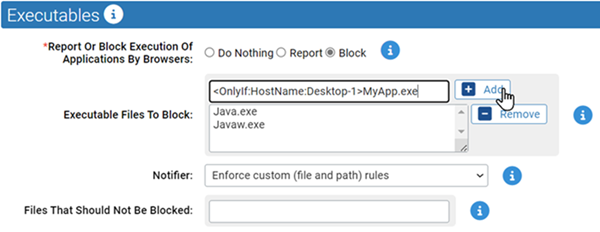
For example, if you set the Browser Protection Rapid Config to report executions of
Java.exe, Javaw.exe, and FlashPlayerApp.exe, plus you
added the parameter <OnlyIf:HostName:Desktop-1>MyApp.exe, the
Rapid Config would report execution of MyApp.exe only on Desktop-1 but
it would report execution of Java.exe, Javaw.exe, and FlashPlayerApp.exe on any machine. To make all executables conditional, you
must add the OnlyIf macro to each one.
For more information about options and requirements for path and process specification, see Specifying Paths and Processes. Note, however, that some of the options described in that section do not apply to Rapid Configs.
Note: If you specify a script file
in a Rapid Config that controls execution, the config will not recognize the script and
control its execution unless there is a corresponding Script Rule for the file extension
and the process that executes the script. For more details, see Script Rules.