
Deleting Policies
You can delete policies when you no longer need them. However, policies cannot be deleted if any computer is assigned to the policy.
If a policy you want to delete has associated computers, either uninstall the App Control Agent on those computers or, to keep the computers protected by App Control, move the computers to another policy. See Moving Computers to Another Policy and "Uninstalling App Control Agents" in the Carbon Black App Control Agent Installation Guide. When you delete a policy, its associated agent installer is deleted from the App Control Server.
The following built-in policies cannot be deleted:
- Default Policy
- Local Approval Policy
- Template Policy
Delete a Policy
Follow this procedure to delete a policy.
-
On the console menu, choose
Rules > Policies.
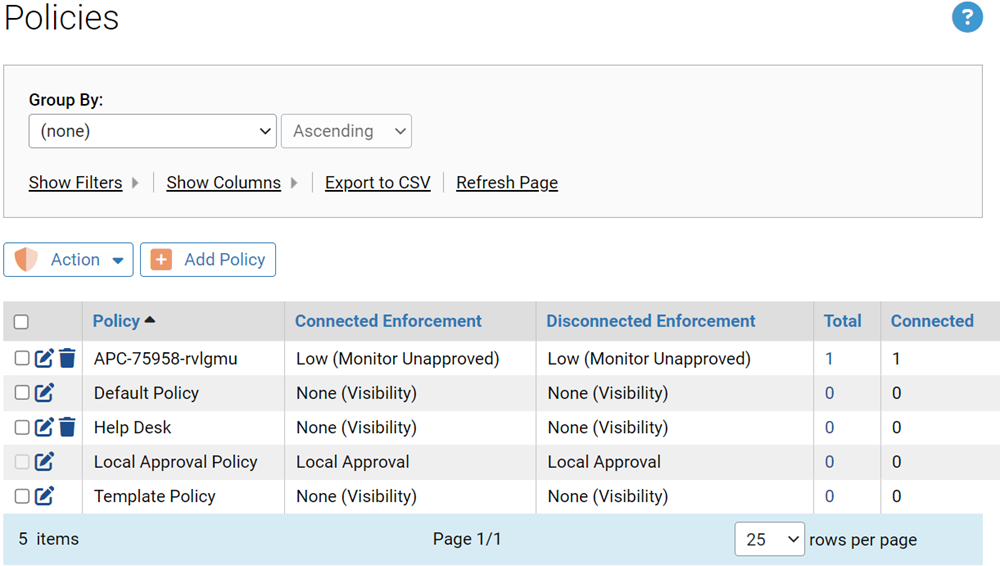
The Policies page appears.
-
On the Policies page, click the
Delete (trashcan) button next to the name of the policy you want to delete.
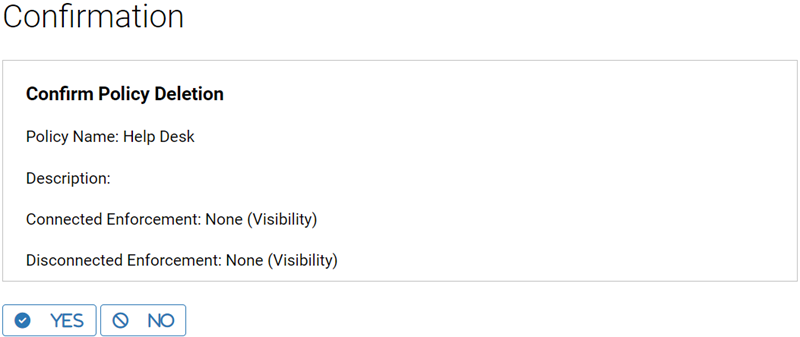
A confirmation dialog appears.
-
Click
Yes. The Policies page is displayed.
Note: If a policy contains computers, clicking Yes in the confirmation dialog displays a deletion failure message on the Policies page. You must move these computers to another policy or delete them (on the Computers Page) before deleting the policy.