
View Current Agent Versions and Package Generation Status
If you have System Health indicators enabled, you are notified when your agent or rule installer versions are out of date. With or without System Health indicators enabled, you can view the current versions of agent and rule installers in the Carbon Black App Control console.
- On the console menu, click Rules > Policies. The Policies page displays.
-
On the Policies page, click the following link: Click here to view
available Carbon Black App Control Agent / Rules versions. The
Installer Versions page displays.
-
Review the version numbers and any status messages for the rules and agent
installers.
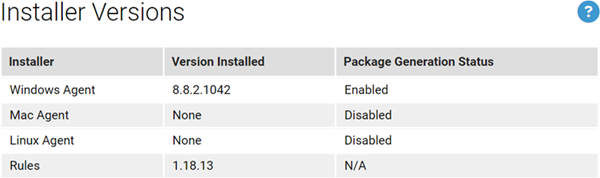
The Installer Version page shows two key pieces of information for the Windows Agent installer, macOS Agent installer, Linux Agent installer, and Rules installer that are currently on the server:
- Version Installed – This is either a version number for the installer in each category, or None if there is no installer for that item.
- Package
Generation Status – Indicates whether installation
packages (that is, the installers that are used on endpoints) are being
generated. Even if there is an agent installer for a platform (for
example, Linux) available on the server, generation of the installer
that will be used on the endpoint might be disabled for that platform.
Possible status messages are:
- Enabled – Indicates that a Rules file is available and agent package generation is enabled for the agent on this platform.
- Disabled – This indicates that agent package generation is disabled. If a version number displays in the Version Installed column, generation is disabled by a setting on a hidden page in the console. If Version Installed shows None, generation is disabled because the agent package for that platform was never installed.
- Disabled due to missing default rules – Indicates that an installer version is uploaded for the agent on this platform, but installers for endpoints cannot be generated because no Rules file is uploaded to the server.
- N/A – This appears for the Rules file because package generation is unnecessary for rules.
- When you have finished reviewing the versions, click the Go back to the policies page link or use the console menu to navigate elsewhere.